
Let's understand ECS clusters!
This article explains clusters, a core component of Amazon ECS. It covers the options available when creating an ECS cluster and introduces methods for building clusters suited to your workloads.

Introduction
This article explains clusters, a core component of Amazon Elastic Container Service (ECS), a container service provided by AWS.
While this content is aimed at beginners, if you haven't fully understood the basics of ECS, we recommend reading the following article first:
Article Goal
Understand the configuration options available for ECS clusters and become able to build clusters suited to your workloads.
What is a Cluster?
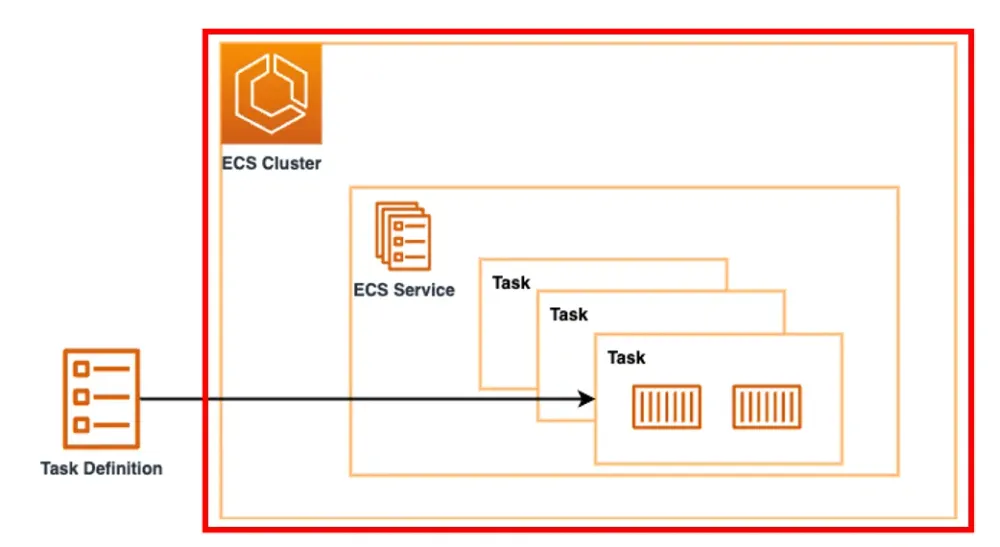
A cluster is a logical group of resources for running containers on ECS.
Simply put, it's like a hosting environment for running your applications.
Configuration Options and How to Choose
Let's explain the options that can be configured when creating a cluster.
Cluster configuration
When creating an ECS cluster, there are basic items to configure first.
Some of these are difficult or impossible to change after creation, so it's important to configure them appropriately during creation.
Cluster name
The cluster name cannot be changed after creation, so it needs to be chosen carefully.
Constraints
- Character count: Maximum 255 characters
- Valid characters: a-z, A-Z, 0-9, hyphen (-), underscore (_)
- Must be unique
Service Connect Default Namespace
This setting specifies the default namespace when services created within the cluster use Service Connect.
What is Service Connect?
Service Connect is a feature that simplifies communication between ECS services.
Instead of connections using traditional IP addresses or load balancers, services can connect to each other using short, easy-to-understand names.
Should You Configure It?
Regarding the configuration of this item, here's a summary for different situations:
Situation | Recommended | Reason |
|---|---|---|
Planning multiple interconnected ECS services | ○ | Simplified connection between services using short names |
Planning microservices architecture | ○ | Simplified management with unified namespace |
Planning single service configuration | × | Not needed as there's no inter-service communication |
Configuration undecided | △ | Can be configured later, so optional |
Learning/testing purposes | △ | Configure based on learning/testing objectives |
Infrastructure
There are primarily two options for the underlying infrastructure used to run containers in an ECS cluster:
- AWS Fargate (Serverless)
- Amazon EC2 instances
AWS Fargate (Serverless) Features
- Serverless
- No need to manage EC2 instances
- AWS automatically handles OS updates, security patching, and more
- Pay-as-you-go
- Charged only for actual CPU, memory, and runtime usage
- No charges while tasks are stopped
- Auto Scaling
- Resources are automatically provisioned as needed
- No capacity planning required
Amazon EC2 Instance Features
- Detailed Control
- Freedom to choose EC2 instance types
- Ability to use custom AMIs (Amazon Machine Images)
- Cost Efficiency
- Potential to reduce costs for applications running for extended periods
- Utilization of Reserved Instances and Spot Instances
- Advanced Configuration
- Custom network settings
- Support for specialized security requirements
Comparison of Options
Based on the features described above, here's a comparison of the two options:
Comparison Item | Fargate | EC2 |
|---|---|---|
Server Management | Not Required | Required |
Initial Setup | Task Definition Only | Task Definition + EC2 Configuration |
Pricing Model | Task Execution Time | EC2 Instance Running Time |
Scalability | Automatic/Unlimited | Manual/Limited |
Customizability | Limited | High |
Operational Overhead | Low | High |
Cost Efficiency | Better for Short-term/Variable Workloads | Better for Long-term/Stable Workloads |
Advanced Infrastructure Management
By configuring "capacity providers", you can control infrastructure management in more detail.
What is a Capacity Provider?
A capacity provider is a mechanism that manages compute resources for running tasks and automatically scales them.
This allows infrastructure to automatically scale in and out according to the number of tasks.
Types
- FARGATE
- FARGATE_SPOT
- EC2 Auto Scaling Group
Constraints
When creating a cluster through the Management Console, it cannot be configured at cluster creation time and must be configured after cluster creation is complete.
Monitoring
Monitoring is an important element for maintaining the reliability, availability, and performance of container environments.
By enabling monitoring with Container Insights during cluster creation, you can collect detailed metrics and logs.
What is Container Insights?
Container Insights is one of CloudWatch's features that collects, aggregates, and summarizes metrics and logs for containerized applications and microservices.
On December 2, 2024, Container Insights with enhanced observability for Amazon ECS was released.
Differences Between Standard and Enhanced Versions

Key Differences
- Standard version: Focuses on aggregated values for tasks and services as a whole
- Enhanced version: Detailed values for individual containers + percentage display added
- Cost: Enhanced version incurs custom metrics charges (approximately 2-3 times the standard version)
Should You Configure It?
Regarding the configuration of this item, here's a summary for each environment:
Environment | Recommended | Reason |
|---|---|---|
Production | Enhanced | Essential for detailed monitoring and troubleshooting |
Staging | Standard | Needs production-level monitoring but considering costs |
Development | Optional/Disabled | Enable only when needed to reduce costs |
Encryption
By selecting the KMS key used by tasks running in the cluster, you can encrypt your storage.
While not a required configuration item, it is recommended for production environments.
Target Storage
- Managed storage
- Fargate ephemeral storage
Encryption Options
- AWS managed key
- Customer managed key
Tags
Tags help identify and organize clusters.
You can set up to 50 tags, which can be utilized for cost management, access control, and resource organization.
Summary
- Infrastructure Selection
- Want to reduce management overhead → Fargate
- Want to optimize costs → EC2 (utilizing Spot)
- Leverage benefits of both → Hybrid environment
- Configuration Policy by Environment
- Development: Cost priority, minimal configuration
- Staging: Production equivalent, cost balance
- Production: Availability and security priority
- Monitoring and Security
- Container Insights is essential in production environments
- KMS encryption depends on compliance requirements
Enjoyed reading this content? Let the author know!
Your likes, comments, shares, and saves help creators reach more builders.

Loading recommendations
Loading article